

Remove background noise
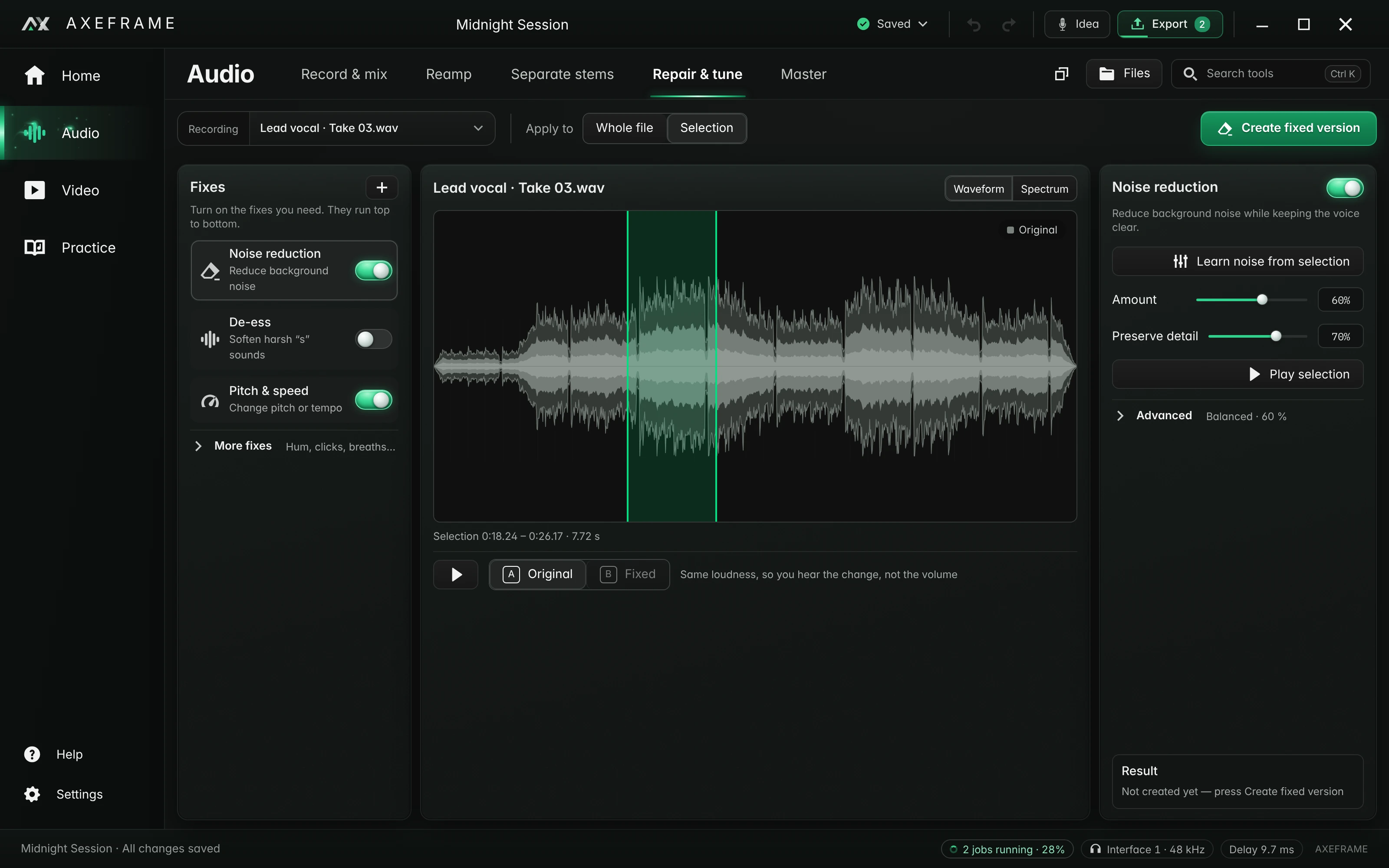
Reduce hiss, room noise, mains hum, rumble and wind. Learn the noise from a quiet moment and remove just that.

Repair & tune is AXEFRAME’s audio repair workspace. Remove background noise, hum, clicks and room echo, soften harsh “s” sounds and pops, and pull sung notes gently into tune, without losing the performance.
In development for Windows No account needed to join
Noise · Hum · Clicks · Echo · Pitch
Audio repair software
Reduce hiss, room noise, mains hum, rumble and wind. Learn the noise from a quiet moment and remove just that.
Remove clicks and mouth noise, soften “p” and “b” pops and harsh “s” sounds, and turn down breaths between phrases.
Pull sung notes gently into tune with the song’s key, change pitch or tempo, or add a harmony that follows the key.
How it works
Every fix is non-destructive: your original recording is never changed.
Choose a take from your project, the whole file or just a selection.
Noise reduction, de-ess, pitch correction and more, in order from top to bottom.
Listen to the original and the fixed version at the same loudness, then create the fixed version.
More fixes
Rebuild peaks that were recorded too loud, take the echo of a large room out of a recording, make a roomy take drier, or bring back clarity to a phone or old recording.
Repair & tune works on any recording in your project, then the fixed version is ready to mix and master.
Straight answers
What it does, what to expect, and where AXEFRAME is heading.
In Repair & tune, turn on Noise reduction. For the best result, select a moment with only the noise and press Learn noise from selection, then set how much to remove while keeping the detail.
Yes. Pitch correction pulls sung notes gently into tune with the song’s key. You can also change pitch or tempo, and add a harmony voice that follows the key.
No. Fixes are made as a new version; the original stays unchanged.
Fix clipping rebuilds the tops of peaks that were recorded too loud. It can improve mild clipping a lot; heavy distortion can only be reduced.
No. Repairs are designed to run on your own Windows PC.
Often, yes. Restore brings back clarity to phone and old recordings, and Noise reduction, Reduce room sound and De-ess tidy what is left. Very distorted recordings can only be improved so far.
It does the same job, pulling notes towards the song’s key. AXEFRAME’s pitch correction is designed to be gentle, so the voice still sounds natural.
AXEFRAME is in development for Windows and no release date has been announced. Join the waiting list to hear first.
Be part of what comes next
Be first to hear when AXEFRAME’s Repair & tune is ready.